I found another thread about Revit Crashing on Startup which can be found below.
http://forums.autodesk.com/t5/Autodesk-Revit-Structure/Random-Crashes-in-Revit-2010/m-p/2582907
Is Revit crashing on startup?
If so, you may want to look at this thread:
http://discussion.autodesk.com/forums/thread.jspa?threadID=774015
You could try two things:
UI State.dat may be corrupt- More information on this is here:
http://revitclinic.typepad.com/my_weblog/2009/04/revit-2010-ui.html
or here:
http://dorevit.blogspot.com/2010/04/revit-10-crashing-uistatedat.html
Short answer:
To reset the ribbon and Quick Access toolbar, rename or delete the UIState.dat file located in the following folders:
For Windows XP:
%USERPROFILE%\Local Settings\Application Data\Autodesk\Revit\Autodesk Revit Structure 2010
For Windows Vista/ Windows 7:
%LOCALAPPDATA%\Autodesk\Revit\Autodesk Revit Structure 2010
Or a CommCenter file may be corrupt: From the information here:
http://usa.autodesk.com/adsk/servlet/ps/dl/item?siteID=123112&id=15145616&linkID=9243099
This can occur because of a conflict with a Communication Center file. Delete the following file, if present on the workstation at the following location:
Windows XP
Autodesk Revit Structure 2010
c:\Documents and Settings\%USERNAME%\Local Settings\Application Data\Autodesk\Revit\Autodesk Revit Structure 2010\ENU\Components\WebServices\WSCommCntrData.xml
Windows Vista \ Windows 7
Autodesk Revit Structure 2010
C:\Users\%username%\AppData\Local\Autodesk\Revit\Autodesk Revit Structure 2010\ENU\Components\WebServices\WSCommCntrData.xml
Tuesday, July 27, 2010
Monday, July 26, 2010
Revit Architecture 2011 Certification
Simplicity is great! The official Autodesk Revit Architecture 2011 training guide and exam prep guide is now available in one book:
Mastering Autodesk Revit Architecture 2011 [Paperback]
Eddy Krygiel (Author), Phil Read (Author), James Vandezande (Author)
Here's the Autodesk Exam Preparation Road map pdf.
The book is not yet available in Canada but I have mine on pre-order. Knowing the authors, I'm absolutely sure of their level of skill, detail and commitment. Here's their blog, it's a great read.
Update: Just got mine in the mail, looks good!

Mastering Autodesk Revit Architecture 2011 [Paperback]
Eddy Krygiel (Author), Phil Read (Author), James Vandezande (Author)
Here's the Autodesk Exam Preparation Road map pdf.
The book is not yet available in Canada but I have mine on pre-order. Knowing the authors, I'm absolutely sure of their level of skill, detail and commitment. Here's their blog, it's a great read.
Update: Just got mine in the mail, looks good!

Point Known - Laser Measurements into Revit (Revit OPED)
Point the laser, draw a wall in Revit...
This seems like a great solution for building surveying, on-site measuring, as-built measuring or whatever you may call it. I saw this on Steve Stafford's blog http://revitoped.blogspot.com/.
Worth a watch:
This seems like a great solution for building surveying, on-site measuring, as-built measuring or whatever you may call it. I saw this on Steve Stafford's blog http://revitoped.blogspot.com/.
Worth a watch:
Thursday, July 22, 2010
Can't Get Network License Error 15.370.?
Just encountered this issue for a Maya install but it applies to Revit etc. Plus the error was just 15.370.00 not 15.370.36. The fix still worked.
You configured a machine to be a network license server and then installed an Autodesk product on the same machine. When you launch the product, it tries to check out a network license and fails.
On Windows, the FLEXnet Finder dialog displays and, when dismissed, is followed by a license error dialog displaying the error code [-15.570.36]. In the Mac OS, a license error dialog displays the same error code but it does not display a FLEXnet Finder dialog.
This happens on all operating systems where an IPv6 stack is installed.
Solution
The following steps should allow the client to find the server and check out a license file:
Windows:
1. Get the IP address of the machine (by typing “ipconfig” command in a CMD window or by getting it from the LMTOOLS “System setting” tab).
2. Open the hosts file located in C:\Windows\System32\drivers\etc.
3. Add the IP address and hostname to the hosts file, e.g., “111.222.333.444 machine_name”.
4. Save and close the hosts file.
Full Autodesk Doc:
http://usa.autodesk.com/adsk/servlet/ps/dl/item?siteID=123112&id=14077688&linkID=9240697
You configured a machine to be a network license server and then installed an Autodesk product on the same machine. When you launch the product, it tries to check out a network license and fails.
On Windows, the FLEXnet Finder dialog displays and, when dismissed, is followed by a license error dialog displaying the error code [-15.570.36]. In the Mac OS, a license error dialog displays the same error code but it does not display a FLEXnet Finder dialog.
This happens on all operating systems where an IPv6 stack is installed.
Solution
The following steps should allow the client to find the server and check out a license file:
Windows:
1. Get the IP address of the machine (by typing “ipconfig” command in a CMD window or by getting it from the LMTOOLS “System setting” tab).
2. Open the hosts file located in C:\Windows\System32\drivers\etc.
3. Add the IP address and hostname to the hosts file, e.g., “111.222.333.444 machine_name”.
4. Save and close the hosts file.
Full Autodesk Doc:
http://usa.autodesk.com/adsk/servlet/ps/dl/item?siteID=123112&id=14077688&linkID=9240697

Wednesday, July 21, 2010
Revit 2010 and 2011 Not Getting License
All of the Autodesk 2010 and 2011 products have a propensity of corrupting the cascadeinfo.cas file. This file is directly related to the obtaining of a license from LMTools. We have found that when Revit can't find a license from the server you need to do the following:
WorkAround
The current workaround it to rename/remove the corrupt CascadeInfo.cas file following these steps.
1.
Return any borrowed licenses
2.
Check in any checked out licenses and exit all Autodesk products
3.
Rename or delete the corrupt CascadeInfo.cas
The CascadeInfo.cas file can be found in the following locations:
Windows XP:
C:\Documents and Settings\All Users\Application Data\Autodesk\Adlm
Windows Vista and Windows 7:
C:\ProgramData\Autodesk\Adlm
Mac:
/Library/Application Support/Autodesk/Adlm/.config
Here's the full Autodesk technical document:
http://usa.autodesk.com/adsk/servlet/ps/dl/item?siteID=123112&id=13894457&linkID=9240817
other links:
http://forums.autodesk.com/t5/AutoCAD-2010/autocad-2010-crashes-at-startup/m-p/2523880
http://forums.autodesk.com/t5/Installation-Licensing/Error-5-412-0-Error-4-132-0/m-p/2521683
One word of caution. This may cause your corresponding AutoCAD product to crash on startup. We are looking into this and I will post when I get an answer for this.
WorkAround
The current workaround it to rename/remove the corrupt CascadeInfo.cas file following these steps.
1.
Return any borrowed licenses
2.
Check in any checked out licenses and exit all Autodesk products
3.
Rename or delete the corrupt CascadeInfo.cas
The CascadeInfo.cas file can be found in the following locations:
Windows XP:
C:\Documents and Settings\All Users\Application Data\Autodesk\Adlm
Windows Vista and Windows 7:
C:\ProgramData\Autodesk\Adlm
Mac:
/Library/Application Support/Autodesk/Adlm/.config
Here's the full Autodesk technical document:
http://usa.autodesk.com/adsk/servlet/ps/dl/item?siteID=123112&id=13894457&linkID=9240817
other links:
http://forums.autodesk.com/t5/AutoCAD-2010/autocad-2010-crashes-at-startup/m-p/2523880
http://forums.autodesk.com/t5/Installation-Licensing/Error-5-412-0-Error-4-132-0/m-p/2521683
One word of caution. This may cause your corresponding AutoCAD product to crash on startup. We are looking into this and I will post when I get an answer for this.
Friday, June 04, 2010
IESVE Approved for LEED Canada
This is a good press release from IES. IESVE is a good, solid and trustworthy energy modeler...
IESVE is approved energy simulation software for LEED Canada
Integrated Environmental Solutions (IES) is pleased to let you know that the Virtual Environment (VE) is now an approved energy simulation software for LEED Canada to demonstrate compliance for Energy and Atmosphere (EA) Prerequisite 2 and EA Credit 1.
Take a look at the Canada Green Building Council web site to find out more.
For LEED Canada the energy simulation software program must also meet the requirements for Qualified Software per IRS Notice 2006-52 as amplified by IRS Notice 2008-40, Section 4.
You can access the approved software list which the VE is on at:
http://www1.eere.energy.gov/buildings/qualified_software.html
You can also access the pdf providing details on the VE compliance with the requirements at:
http://apps1.eere.energy.gov/buildings/publications/pdfs/corporate/ns/qs_iesve_v6_1.pdf
IES can review and approve your VE models for LEED Canada
Are you looking for an independent assessor to review and approve your energy models created in the VE? IES can help you.
As an approved Experienced Modeller, Luc Delestrade (Senior Project Consultant at IES) can review energy models prepared in the VE. Based in Vancouver, Luc is a highly experienced energy modeller and building simulation consultant with significant experience in assisting design teams to achieve their low energy targets.
Contact Luc to find out how he can help.
Email luc.delestrade@iesve.com
Call+1 (604) 561 4842
IESVE is approved energy simulation software for LEED Canada
Integrated Environmental Solutions (IES) is pleased to let you know that the Virtual Environment (VE) is now an approved energy simulation software for LEED Canada to demonstrate compliance for Energy and Atmosphere (EA) Prerequisite 2 and EA Credit 1.
Take a look at the Canada Green Building Council web site to find out more.
For LEED Canada the energy simulation software program must also meet the requirements for Qualified Software per IRS Notice 2006-52 as amplified by IRS Notice 2008-40, Section 4.
You can access the approved software list which the VE is on at:
http://www1.eere.energy.gov/buildings/qualified_software.html
You can also access the pdf providing details on the VE compliance with the requirements at:
http://apps1.eere.energy.gov/buildings/publications/pdfs/corporate/ns/qs_iesve_v6_1.pdf
IES can review and approve your VE models for LEED Canada
Are you looking for an independent assessor to review and approve your energy models created in the VE? IES can help you.
As an approved Experienced Modeller, Luc Delestrade (Senior Project Consultant at IES) can review energy models prepared in the VE. Based in Vancouver, Luc is a highly experienced energy modeller and building simulation consultant with significant experience in assisting design teams to achieve their low energy targets.
Contact Luc to find out how he can help.
Email luc.delestrade@iesve.com
Call+1 (604) 561 4842
Template Change
Just wanted to let my reader know that I changed my blog template. If http://www.architecture-tech.com/ can do it, so can I.
Thanks for reading, Bob. See you at darts.
Thanks for reading, Bob. See you at darts.
Monday, May 31, 2010
Revit PCP Files
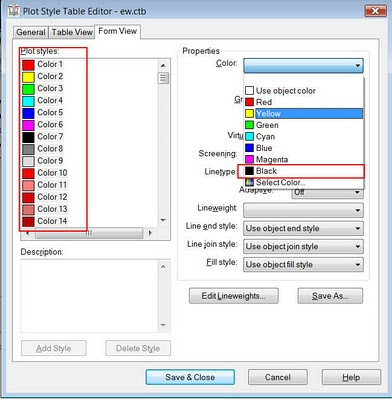
When converted to a ctb, pcp files do NOT involve the colour. You will need to set this to black. Here's an explanation...
When exporting a Revit file to AutoCAD a 'pcp' file is created in the same folder of the 'dwg'. This file is intended to duplicate the lineweight of the Revit file in the AutoCAD file. You will need to convert the pcp file to a ctb file in AutoCAD.
-You can do this by using the Print-Manage Plot Styles-Add a Plot Style Wizard.
-The Wizard will prompt you for a pcp file as you go.
-Before you finish click on the Plot Style Table Editor button.
-Then go to Form View. Select all of the colours (listed as Plot styles). Then change their property colour to black.
When exporting a Revit file to AutoCAD a 'pcp' file is created in the same folder of the 'dwg'. This file is intended to duplicate the lineweight of the Revit file in the AutoCAD file. You will need to convert the pcp file to a ctb file in AutoCAD.
-You can do this by using the Print-Manage Plot Styles-Add a Plot Style Wizard.
-The Wizard will prompt you for a pcp file as you go.
-Before you finish click on the Plot Style Table Editor button.
-Then go to Form View. Select all of the colours (listed as Plot styles). Then change their property colour to black.

Tuesday, May 18, 2010
AU2010 Presentation Voting
Autodesk University Class Voting
Go to Architecture Power Track
I have submitted two presentations for this year:
2840
Revit Residential Survival Guide
Lecture
Polding, Jay
8173
Design Your Own Adventure: Integrating Energy and Cost Analysis into Revit
Lecture
Polding, Jay
Go to Architecture Power Track
I have submitted two presentations for this year:
2840
Revit Residential Survival Guide
Lecture
Polding, Jay
8173
Design Your Own Adventure: Integrating Energy and Cost Analysis into Revit
Lecture
Polding, Jay
Walls Disappearing
Here's the scenario...You have a wall which can be seen in 3D, section and elevation but not in plan. You have confirmed the usual visibility issues are not to blame.
It could be a corrupt Plan Region. Look around the wall in question, find the Plan Region and delete it. How do you know which one is corrupt...trial and error. Autodesk development is aware of this bug and is working on it.
It could be a corrupt Plan Region. Look around the wall in question, find the Plan Region and delete it. How do you know which one is corrupt...trial and error. Autodesk development is aware of this bug and is working on it.
Thursday, May 13, 2010
Common Installation and Licensing Troubleshooting
Video: Troubleshooting Revit Install and Licensing Issues
http://usa.autodesk.com/adsk/servlet/ps/dl/item?siteID=123112&id=14878060&linkID=9243182
Video: Troubleshooting Common Install Problems
http://usa.autodesk.com/adsk/servlet/ps/dl/item?siteID=123112&id=14868637&linkID=9240697
Video: Network Installation (doesn't include LMTools or license file acquisition)
http://www.youtube.com/watch?v=QDOwkw4VMU0
http://usa.autodesk.com/adsk/servlet/ps/dl/item?siteID=123112&id=14878060&linkID=9243182
Video: Troubleshooting Common Install Problems
http://usa.autodesk.com/adsk/servlet/ps/dl/item?siteID=123112&id=14868637&linkID=9240697
Video: Network Installation (doesn't include LMTools or license file acquisition)
http://www.youtube.com/watch?v=QDOwkw4VMU0
Divisions
Note to self...
PROCUREMENT AND CONTRACTING REQUIREMENTS GROUP:
Division 00 — Procurement and Contracting Requirements
SPECIFICATIONS GROUP
General Requirements Subgroup
Division 01 — General Requirements
Facility Construction Subgroup
Division 02 — Existing Conditions
Division 03 — Concrete
Division 04 — Masonry
Division 05 — Metals
Division 06 — Wood, Plastics, and Composites
Division 07 — Thermal and Moisture Protection
Division 08 — Openings
Division 09 — Finishes
Division 10 — Specialties
Division 11 — Equipment
Division 12 — Furnishings
Division 13 — Special Construction
Division 14 — Conveying Equipment
Division 15 — RESERVED FOR FUTURE EXPANSION
Division 16 — RESERVED FOR FUTURE EXPANSION
Facility Services Subgroup:
Division 20 — RESERVED FOR FUTURE EXPANSION
Division 21 — Fire Suppression
Division 22 — Plumbing
Division 23 — Heating Ventilating and Air Conditioning
Division 24 — RESERVED FOR FUTURE EXPANSION
Division 25 — Integrated Automation
Division 26 — Electrical
Division 27 — Communications
Division 28 — Electronic Safety and Security
Division 29 — RESERVED FOR FUTURE EXPANSION
Site and Infrastructure Subgroup:
Division 30 — RESERVED FOR FUTURE EXPANSION
Division 31 — Earthwork
Division 32 — Exterior Improvements
Division 33 — Utilities
Division 34 — Transportation
Division 35 — Waterway and Marine
Division 36 — RESERVED FOR FUTURE EXPANSION
Division 37 — RESERVED FOR FUTURE EXPANSION
Division 38 — RESERVED FOR FUTURE EXPANSION
Division 39 — RESERVED FOR FUTURE EXPANSION
Process Equipment Subgroup:
Division 40 — Process Integration
Division 41 — Material Processing and Handling Equipment
Division 42 — Process Heating, Cooling, and Drying Equipment
Division 43 — Process Gas and Liquid Handling, Purification and Storage Equipment
Division 44 — Pollution Control Equipment
Division 45 — Industry-Specific Manufacturing Equipment
Division 46 — RESERVED FOR FUTURE EXPANSION
Division 47 — RESERVED FOR FUTURE EXPANSION
Division 48 — Electrical Power Generation
Division 49 — RESERVED FOR FUTURE EXPANSION
PROCUREMENT AND CONTRACTING REQUIREMENTS GROUP:
Division 00 — Procurement and Contracting Requirements
SPECIFICATIONS GROUP
General Requirements Subgroup
Division 01 — General Requirements
Facility Construction Subgroup
Division 02 — Existing Conditions
Division 03 — Concrete
Division 04 — Masonry
Division 05 — Metals
Division 06 — Wood, Plastics, and Composites
Division 07 — Thermal and Moisture Protection
Division 08 — Openings
Division 09 — Finishes
Division 10 — Specialties
Division 11 — Equipment
Division 12 — Furnishings
Division 13 — Special Construction
Division 14 — Conveying Equipment
Division 15 — RESERVED FOR FUTURE EXPANSION
Division 16 — RESERVED FOR FUTURE EXPANSION
Facility Services Subgroup:
Division 20 — RESERVED FOR FUTURE EXPANSION
Division 21 — Fire Suppression
Division 22 — Plumbing
Division 23 — Heating Ventilating and Air Conditioning
Division 24 — RESERVED FOR FUTURE EXPANSION
Division 25 — Integrated Automation
Division 26 — Electrical
Division 27 — Communications
Division 28 — Electronic Safety and Security
Division 29 — RESERVED FOR FUTURE EXPANSION
Site and Infrastructure Subgroup:
Division 30 — RESERVED FOR FUTURE EXPANSION
Division 31 — Earthwork
Division 32 — Exterior Improvements
Division 33 — Utilities
Division 34 — Transportation
Division 35 — Waterway and Marine
Division 36 — RESERVED FOR FUTURE EXPANSION
Division 37 — RESERVED FOR FUTURE EXPANSION
Division 38 — RESERVED FOR FUTURE EXPANSION
Division 39 — RESERVED FOR FUTURE EXPANSION
Process Equipment Subgroup:
Division 40 — Process Integration
Division 41 — Material Processing and Handling Equipment
Division 42 — Process Heating, Cooling, and Drying Equipment
Division 43 — Process Gas and Liquid Handling, Purification and Storage Equipment
Division 44 — Pollution Control Equipment
Division 45 — Industry-Specific Manufacturing Equipment
Division 46 — RESERVED FOR FUTURE EXPANSION
Division 47 — RESERVED FOR FUTURE EXPANSION
Division 48 — Electrical Power Generation
Division 49 — RESERVED FOR FUTURE EXPANSION
Tuesday, May 11, 2010
Revit Suite Network License Bumped
This is one of the many possible things that can cause you to not get a network license for a Revit Suite product.
If the CascadeInfo.cas file is corrupt due to a power failure or any reason, cascading functionality will not be available. This issue only applies to network licensed products and does not affect stand-alone licensed products.
WorkAround
The current workaround it to rename/remove the corrupt CascadeInfo.cas file following these steps.
Return any borrowed licenses
Check in any checked out licenses and exit all Autodesk products
Rename or delete the corrupt CascadeInfo.cas
more...
http://usa.autodesk.com/adsk/servlet/ps/dl/item?siteID=123112&id=13894457&linkID=9240617
If the CascadeInfo.cas file is corrupt due to a power failure or any reason, cascading functionality will not be available. This issue only applies to network licensed products and does not affect stand-alone licensed products.
WorkAround
The current workaround it to rename/remove the corrupt CascadeInfo.cas file following these steps.
Return any borrowed licenses
Check in any checked out licenses and exit all Autodesk products
Rename or delete the corrupt CascadeInfo.cas
more...
http://usa.autodesk.com/adsk/servlet/ps/dl/item?siteID=123112&id=13894457&linkID=9240617
Monday, May 10, 2010
Hatches and Materials on Blends in Families
Let's say that you have a tapered brick column family. When you apply the brick material, one side is horizontal but the other side is vertical. There are a couple of things that affect this.


Although we would like be able to create a material parameter for this scenario we can't. This is because we cannot rotate hatch which is applied to a family in a project file. Also, when you apply materials/hatches to blends it tends to rotate the model hatch in strange ways.
This means that we need to apply the material to the blend in the family editor and rotate it right there. You will also be able to adjust the coursing. You can pick directly on the hatch line by using the TAB key, then you can use the rotate and move commands as needed.

Families have limited material choices by default. I'm planning on making another post to explain the best way of importing materials into your custom family.
Thursday, May 06, 2010
Revit Wishlist - Just Do it!
There are some really practical suggestions on this year's wishlist. Make sure you vote...
http://www.augi.com/revit/ballot.asp
Lack of site tools wishes makes me wonder if/when Revit Civil will be revealed?
http://www.augi.com/revit/ballot.asp
Lack of site tools wishes makes me wonder if/when Revit Civil will be revealed?
Wednesday, April 21, 2010
Autodesk 2011 Product Launch Event
Hopefully you will be able to attend our May 7th launch event where I will be delivering two presentations. Here's a description of one of them:
Design Your Own Adventure:
Combining Energy and Cost Analysis with Autodesk® Revit® Architecture
Design can be like a ‘Choose Your Own Adventure® ’ book. Wouldn’t it be nice to flip to the ending instead of heading out on a long design detour? When it comes to sustainable design decisions, the earlier they are made, the better. Make informed decisions based on good information. Along with best practices, we need to be armed with accurate data about the building; price, energy usage, appearance etc. One way we can get this information is by using Autodesk® Revit® Architecture, along with programs like Autodesk® Green Building Studio®, the IES Toolkit and SmartBIM QTO. We will examine a scenario where the designer and client are trying to understand the implications of design decisions on price, LEED credits including the LEED Daylight credit, and overall energy usage. We will document the process and provide best practices in using these analysis solutions. Go ahead, flip to the end of the book and design your own adventure!
Autodesk® 2011 Solutions Event
Date & Time: Friday, May 7, 20108:30am - 2:00pm
LocationToronto Congress Centre 650 Dixon RoadToronto, ON M9W 1J1
Click here for the fancy invitation loaded with information...
Design Your Own Adventure:
Combining Energy and Cost Analysis with Autodesk® Revit® Architecture
Design can be like a ‘Choose Your Own Adventure® ’ book. Wouldn’t it be nice to flip to the ending instead of heading out on a long design detour? When it comes to sustainable design decisions, the earlier they are made, the better. Make informed decisions based on good information. Along with best practices, we need to be armed with accurate data about the building; price, energy usage, appearance etc. One way we can get this information is by using Autodesk® Revit® Architecture, along with programs like Autodesk® Green Building Studio®, the IES Toolkit and SmartBIM QTO. We will examine a scenario where the designer and client are trying to understand the implications of design decisions on price, LEED credits including the LEED Daylight credit, and overall energy usage. We will document the process and provide best practices in using these analysis solutions. Go ahead, flip to the end of the book and design your own adventure!
Autodesk® 2011 Solutions Event
Date & Time: Friday, May 7, 20108:30am - 2:00pm
LocationToronto Congress Centre 650 Dixon RoadToronto, ON M9W 1J1
Click here for the fancy invitation loaded with information...
Autodesk 2011 Product Keys - Revit3D
Thanks to Gregory Arkin for posting this...
2011 Product Keys
Product Key
License Description
237C1 AutoCAD Civil 3D 2011 English, International
240C1 Revit Architecture 2011 English, International
255C1 Revit Structure 2011 English, International
001C1 AutoCAD 2011 English, International
057C1 AutoCAD LT 2011 English, International
129C1 AutoCAD Map 3D 2011 English, International
240C1 Revit Architecture 2011 English, International
507C1 Autodesk Navisworks Manage 2011 English, International
235C1 AutoCAD MEP 2011 English, International
185C1 AutoCAD Architecture 2011 English, International
057C1 AutoCAD LT 2011 Multi-Lang 11
001C1 AutoCAD 2011 Multi-Lang AMER 1
129C1 AutoCAD Map 3D 2011 English, International
128C1 Autodesk 3ds Max 2011 English, International
661C1 Autodesk 3ds Max Entertainment Creation Suite 2011 English, International
661C1 Autodesk 3ds Max Entertainment Creation Suite 2011 English, International
660C1 Autodesk Maya Entertainment Creation Suite 2011 English, International
256C1 AutoCAD Revit Structure Suite 2011 English, International
241C1 AutoCAD Revit Architecture Suite 2011 English, International
257C1 AutoCAD Revit MEP Suite 2011 English, International
593C1 Autodesk Ecotect Analysis 2011 English, International
237C1 AutoCAD Civil 3D 2011 English, International
Orbiting and Camera Views
This is a 'heads up' to you if you're working with Revit cameras. If you are doing multiple renderings of the same view I would highly recommend duplicating the camera view for each version. You should also make a duplicate if you plan on orbiting. If you orbit (shift-middle mouse roller-button) while in a camera view it is very difficult to get back to your original vantage point. Undo will not get you back.
Friday, April 16, 2010
Revit Architecture 2011
This looks like a good release. Many wishlist and workaround items were addressed. Thank you, to the Revit team at Autodesk.
Here are a few goodies...
Interface is more consistent and faster
Better control of linked files
Control of Temporary Dimensions size
Align works on Wall tops in 3D
Select All, View or Project
Bullets, Text Box and Leader placement controls
Placeholder sheets and grids for lining up views on sheets
Custom elevation tag
List sheets not in a project on drawing list
Background images in renderings
Repeat last command
Removal of 4 core rendering limit
Here's a comprehensive list...
Here are a few goodies...
Interface is more consistent and faster
Better control of linked files
Control of Temporary Dimensions size
Align works on Wall tops in 3D
Select All, View or Project
Bullets, Text Box and Leader placement controls
Placeholder sheets and grids for lining up views on sheets
Custom elevation tag
List sheets not in a project on drawing list
Background images in renderings
Repeat last command
Removal of 4 core rendering limit
Here's a comprehensive list...
Subscribe to:
Posts (Atom)

 Posts
Posts


